
Chatbot
NewGive customers helpful answers 24/7 using your business knowledge.

Connect with customers worldwide through targeted WhatsApp messaging, chatbots, and conversation tools built for business growth.
WhatsAppConnect with your audience worldwide through highly targeted, impactful WhatsApp messaging
Our platform lets you send messages to many customers at once—without creating a group. It’s perfect for promotions, updates, and reminders, and gets better engagement thanks to WhatsApp’s massive reach.


Make the feature set obvious before visitors reach the detailed sections. Each card introduces one feature and links to its full explanation below.
Give customers helpful answers 24/7 using your business knowledge.

Manage customer chats, replies and follow-ups from one centralised workspace.
Reach selected audiences with private one-to-one WhatsApp campaigns.
ChatbotAutomate your conversations with Chatbots built with Google's cutting-edge Gemini AI Assistant.

Automatically answer customer inquiries the moment they come in.

Gemini LLM understands context and nuance, providing your customers with quick, helpful, natural-sounding responses.

The AI seamlessly hands the chat over to your live agents intelligently.

Gemini-powered Chatbot answer customer inquiries at all times, even when you're not around.
Customers may contact your business at any time and often expect a quick answer. Chatbot responds 24/7 using only the information in your uploaded knowledge base, helping customers get relevant answers faster while reducing the time your team spends handling repetitive enquiries. Every Chatbot and human reply remains visible in Conversation, so you can monitor each interaction and take over whenever needed.
Questions may arrive when no one from your team is available to respond.
Provide helpful responses 24/7, so customers can get the information they need without waiting for business hours.
Common questions about products, services and business information can take up valuable time.
Use your uploaded knowledge base to provide quick answers to frequently asked customer questions.
Answers can vary when business information is handled manually across different conversations.
Chatbot responds using only your uploaded business knowledge and can be customised to match your preferred tone.
Angry messages, sensitive enquiries or requests for a human should not be left to automated replies.
When selected keywords or negative sentiment are detected, Chatbot temporarily pauses its replies and alerts the account owner by email and dashboard notification, helping a human take over sooner. Chatbot can be turned back on for that customer at any time.
ConversationsManage customer chats, replies and follow-ups from one centralised workspace.
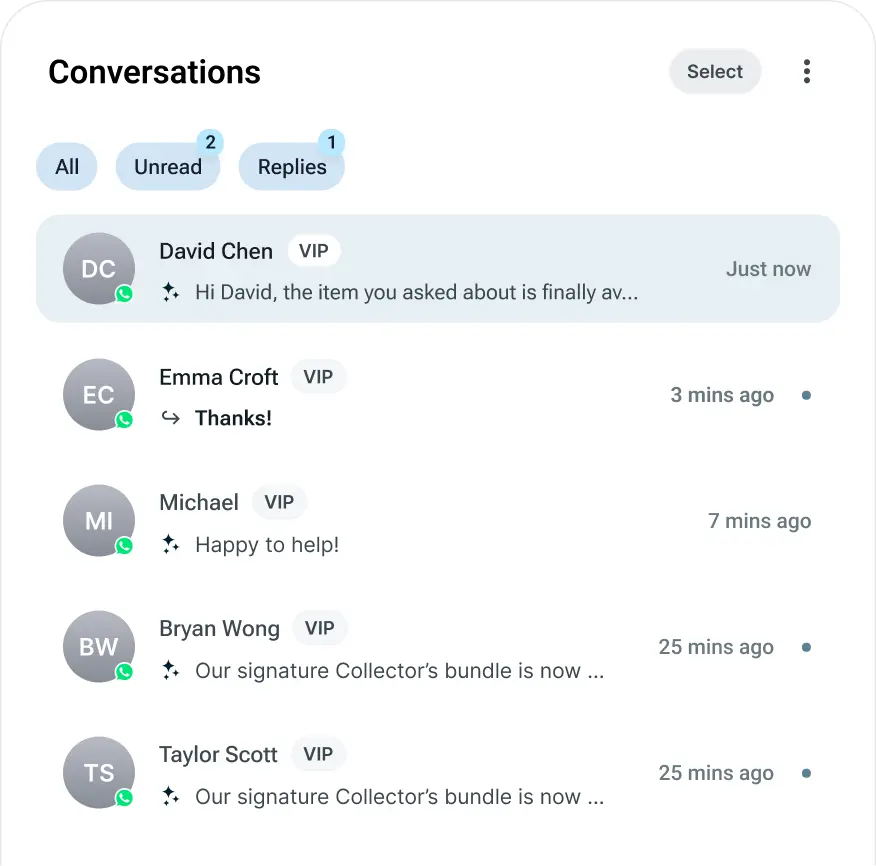
Customers expect quick replies, especially when they are ready to enquire or make a purchase. Conversation brings your WhatsApp chats into one centralised workspace, helping you see new messages in real time, respond faster and keep every customer interaction easy to follow.
Important customer enquiries may remain unnoticed when you are busy or not logged in to the platform.
See new messages in real time and configure email reminders for unread conversations, helping you respond sooner even when you are not logged in.
Important conversations can become harder to locate as more customer messages arrive.
View ongoing chats in one place, making it easier to find conversations and follow up with customers.
Free-form replies can no longer be sent once the active service window closes.
Start a new conversation or reconnect with customers using approved WhatsApp templates.
Customer details may not be organised for future marketing and engagement.
Save contacts to Audience and reconnect with them through future campaigns and broadcasts.
BroadcastWhether you are sharing a promotion, launching a product, sending reminders or providing important updates, sending messages one by one takes time. Broadcast helps you reach selected audiences through private one-to-one WhatsApp messages using Meta-approved templates. Choose your audience, connected WhatsApp number and message template, then send immediately or schedule the campaign for the right date and time.
Reaching a large number of customers individually can slow down your marketing and communication.
Send to multiple customers at once, with each recipient receiving a private one-to-one WhatsApp message.
Customer contacts may be stored in files, saved groups or different parts of your workflow.
Import CSV, XLS or XLSX contacts, select a saved contact group or enter contacts manually.
Sending too early or too late may reduce the impact of an important message.
Launch immediately or choose a specific date and time for your campaign to be sent.
An incorrect audience, message or campaign setup can affect the communication you intend to send.
Check the campaign name, recipients, destination country, estimated cost and message preview before sending.
Without context, it may be difficult to see what a customer received before they responded.
Sent Broadcast messages also appear in Conversation, so you can see what was sent before continuing the interaction.
New to WhatsApp Business messaging? Start with these common setup questions, then connect your account, verify with Meta, and send your first campaign.